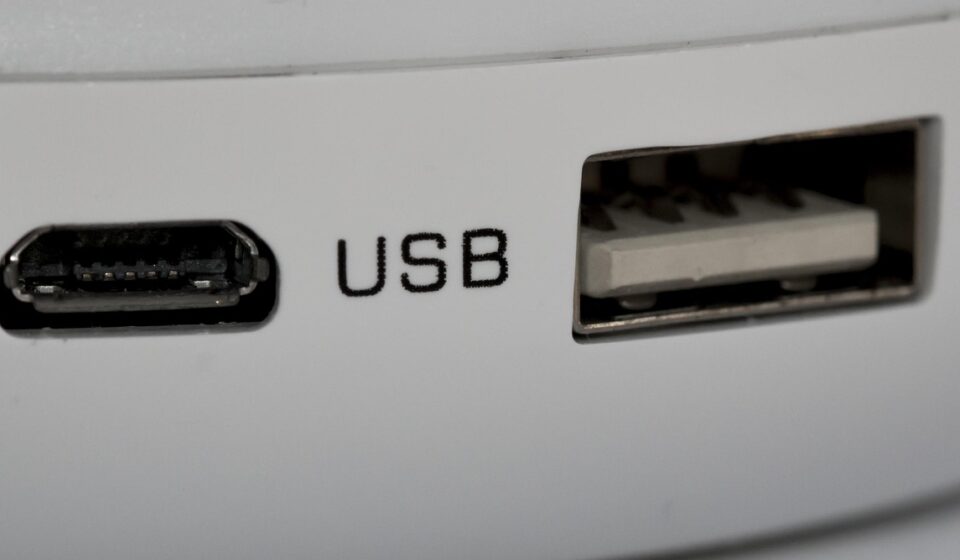
journey of the micro USB connector began with the need for smaller, more durable ports than its predecessor, Mini USB. Introduced around 2007, the micro USB standard was designed to be compact yet capable of handling the increasing data and power demands of burgeoning mobile technology. It quickly became the go-to connector for a wide range of gadgets.
Micro USB connectors typically come in two main forms: Micro-A and Micro-B. While Micro-A was intended for host devices, Micro-B became overwhelmingly dominant, especially for consumer electronics. The USB Implementers Forum (USB-IF) standardized these, ensuring interoperability across manufacturers. This ubiquity was a significant factor in its widespread adoption.
From a different angle, the micro USB standard itself is tied to the broader USB (Universal Serial Bus) specifications. The most common implementations used the USB 2.0 standard, offering data transfer speeds of up to 480 Mbps. However, a Micro-B USB 3.0 variant also exists, featuring a distinctive double-width connector for significantly faster data transfer rates (up to 5 Gbps) and increased power capabilities. Despite its existence, the USB 3.0 Micro-B was less common in consumer devices compared to its USB 2.0 counterpart.

Micro USB Connector Types and Their Design
The physical design of the micro USB connector is key to its functionality and widespread use. The Micro-B connector, the most common type, is characterized by its slim profile and a distinct shape that prevents it from being inserted incorrectly. This design was a significant improvement over earlier USB connectors which could be inserted upside down.
What sets the Micro-B connector apart is its five pins. These pins facilitate not only data transfer but also power and charging functions. The pins are responsible for:
- VBUS (+5V): Provides power to the connected device.
- D- (Data -): Carries one part of the differential data signal.
- D+ (Data +): Carries the other part of the differential data signal.
- ID: This pin’s state determines whether the device acts as a host or a peripheral (often used in OTG – On-The-Go functionality).
- GND (Ground): The common ground reference for power and data.
The USB 3.0 Micro-B connector is essentially a Micro-B connector with an additional section attached to its left, doubling its width. This extended section houses the extra pins required for SuperSpeed data transfer, enabling full-duplex communication (data can be sent and received simultaneously). This design ensured backward compatibility; a USB 2.0 Micro-B cable could still plug into a USB 3.0 Micro-B port, but only at USB 2.0 speeds.
Practically speaking, while the USB 3.0 Micro-B offered superior performance, its bulkier size and the rapid rise of USB-C meant it never achieved the same level of market saturation as the standard USB 2.0 Micro-B. Most devices that adopted the micro USB standard stuck with the simpler, smaller USB 2.0 variant.
Micro USB Capabilities: Data Speeds and Power Delivery
The capabilities of a micro The USB standard it largely dictats uSB connection supports. As mentioned, the vast majority of micro USB devices used the USB 2.0 standard. This offered data transfer speeds of up to 480 Mbps, which was sufficient for many applications at the time, including syncing music, photos, and basic data files between a phone and a computer.
Power delivery via micro USB also evolved. USB 2.0 standard provided up to 2.5 watts (5V at 0.5A). However, the USB Battery Charging (BC) specifications, introduced later, allowed for higher current. BC 1.2, for instance, enabled devices to draw up to 1.5A from dedicated charging ports, significantly speeding up charging times compared to basic USB 2.0 power. This meant a standard micro USB cable could potentially charge your phone much faster, provided both the device and the charger supported BC 1.2.
The USB 3.0 Micro-B variant, on the other hand, offered 5 Gbps data transfer speeds, a tenfold increase over USB 2.0. It also increased the standard power output to 4.5 watts (5V at 0.9A). This was crucial for external hard drives and other peripherals that required more power and faster data transfer. However, as noted, these connectors were less common.
What this means in practice is that not all micro USB cables or ports are created equal. A cable designed solely for USB 2.0 data transfer and basic charging won’t unlock the potential of a USB 3.0 Micro-B port, and conversely, a USB 3.0 Micro-B cable might be physically larger and not fit into a standard Micro-B slot. For most users today, the primary concern with micro USB is its charging capability, and whether it supports faster charging standards.
Why Micro USB Still Matters in 2026: The Lingering Presence
Despite the ascendancy of USB-C, micro USB connectors are far from obsolete as of June 2026. Their continued relevance stems from several key factors:
- Legacy Devices: A massive installed base of older smartphones, tablets, cameras, portable speakers, and countless other gadgets still rely on micro USB. Replacing these would be costly and impractical for many users.
- Cost-Effectiveness: Micro USB components are generally cheaper to manufacture than USB-C. This makes them an attractive option for budget-friendly electronics, low-power devices, or products where advanced features are not a priority.
- Specific Use Cases: Certain niche products, like some industrial equipment, sensors, or specialized testing gear, may continue to use micro USB for reliability or due to existing infrastructure.
- Power Banks and Accessories: Many popular power banks, car chargers, and other portable charging accessories still feature micro USB ports for input charging, or come with micro USB cables as standard.
From a different angle, the ongoing support for micro USB also means that users don’t necessarily need to discard perfectly functional older devices. Micro usb supports a more sustainable approach to technology consumption. However, for new purchases where choice is available, USB-C generally offers superior benefits.

Micro USB vs. USB-C: A Comparative Look
The most significant development in USB connectivity has been the widespread adoption of USB-C. Understanding the differences between micro USB and USB-C is essential for navigating today’s tech ecosystem.
Here’s a breakdown of the key distinctions:
| Feature | Micro USB | USB-C |
|---|---|---|
| Reversibility | Non-reversible (must be inserted correctly) | Fully reversible (plugs in either way) |
| Size | Smaller than standard USB-A, but larger than USB-C | Smallest and most compact of common USB connectors |
| Speed (Max Theoretical) | USB 2.0: 480 Mbps USB 3.0: 5 Gbps |
USB 3.1/3.2: 10 Gbps USB4: 40 Gbps+ |
| Power Delivery (Max Theoretical) | USB 2.0: 2.5W BC 1.2: 7.5W |
USB PD 3.1: Up to 240W |
| Functionality | Primarily data transfer and charging | Data, charging, video output (DisplayPort, HDMI), Thunderbolt, etc. |
| Common Use (2026) | Older smartphones, accessories, budget devices | New smartphones, laptops, tablets, monitors, peripherals |
Practically speaking, the reversibility of USB-C is a major shift, eliminating the frustration of fumbling with connector orientation. And, USB-C’s support for higher data speeds and significantly greater power delivery opens up possibilities for faster charging, powering larger devices like laptops, and transmitting high-resolution video signals over a single cable.
What this means in practice is that while micro USB is still functional for many tasks, USB-C offers a more versatile and future-proof solution. For new devices, especially those requiring high performance or multiple functions, USB-C is the clear choice.
Troubleshooting Common Micro USB Problems
Even with their strong design, micro USB connections can encounter issues. Here are some common problems and how to address them:
- Device Not Charging:
- Check the Cable: Try a different, known-good micro USB cable. Cables can fray internally or have damaged connectors, even if they look fine externally.
- Inspect the Port: Look for debris, lint, or bent pins inside the device’s micro USB port. Use a can of compressed air or a non-metallic tool (like a wooden toothpick) to gently clean it out. Be careful not to damage the pins.
- Test a Different Charger: Ensure your power adapter and wall socket are working correctly. Try a different USB charger or power source.
- Restart the Device: Sometimes a simple reboot can resolve temporary software glitches affecting charging.
- Slow Charging:
- Use a Higher Wattage Charger: Ensure your charger can provide sufficient power (e.g., 2A or more for faster charging, if supported by the device).
- Use a Quality Cable: Cheaper or older cables might not support higher charging currents. A good quality, thicker gauge cable is often better for faster charging.
- Avoid Using While Charging: Heavy usage of a device while it’s charging can slow down the process considerably.
- Data Transfer Issues:
- Try a Different Cable: As with charging, data transfer quality depends heavily on the cable.
- Update Drivers: On a computer, ensure the USB drivers are up-to-date.
- Check Device Settings: Some devices require you to explicitly enable USB data transfer mode in their settings.
- Loose Connection:
- Inspect Connector: If the cable feels loose, the port or the connector on the cable might be worn or damaged. This is more common with older, heavily used cables.
- Consider Replacement: A worn micro USB port on a device can be difficult and expensive to repair, often requiring replacement of the entire charging board.
Practically speaking, for many common issues, the micro USB cable itself is the culprit. Investing in a few reputable, high-quality micro USB cables can save a lot of frustration. According to data from various tech repair outlets, approximately 30-40% of reported “device not charging” issues stem from faulty cables.

The Future of Micro USB and the Push for Universal Connectivity
The trend towards universal connectivity, epitomized by USB-C, signals a clear direction for the future. As of 2026, most new consumer electronics are embracing USB-C for its superior capabilities. Major regulatory bodies, like the European Union, have also pushed for a universal charging standard, with USB-C being the primary candidate.
This doesn’t mean micro USB will vanish overnight. It will likely persist in certain product categories for several more years, particularly where cost and existing infrastructure are primary considerations. However, its role is steadily diminishing.
What this means for consumers is a continued need to manage different cable types for a while. However, as devices with micro USB ports are retired or replaced, the reliance on USB-C will only grow. The ultimate goal is a single, versatile connector that can handle all data, power, and display needs, a vision that USB-C is increasingly fulfilling.
From a different angle, the industry’s move towards USB-C also simplifies manufacturing and reduces electronic waste by standardizing cables. While the transition period requires some patience, the long-term benefits of a universal connector are substantial for both users and the environment.
Expert Insights on Micro USB Adoption and Longevity
Industry analysts and technology reviewers, as of June 2026, largely agree that micro USB has served its purpose exceptionally well but is now in its twilight phase. “Micro USB was a critical stepping stone in miniaturizing device ports and increasing their functionality,” notes Sarah Chen, a senior tech analyst at Gadget Insights Group. “It enabled the smartphone revolution and the proliferation of portable gadgets. However, its limitations in speed and power delivery are undeniable compared to modern standards like USB-C.”
The longevity of micro USB can be attributed to its role in powering a vast ecosystem of accessories. For instance, many popular car chargers, wall adapters, and portable power banks were designed with micro USB output or input ports. As reported by Android Police on June 2, 2026, while manufacturers are increasingly adopting USB-C for new power banks, older, affordable models with micro USB inputs remain widely available and popular for users who own a mix of devices.
And, the cost factor remains significant. For manufacturers producing low-margin items like basic charging cables, USB dongles, or simple peripherals, micro USB offers a more economical solution. This economic reality ensures its presence in the market for a considerable time, especially in developing regions or for specific industrial applications where rapid technological upgrades are not a priority.
The push for standardization, however, is relentless. The European Union’s directive towards a common charger, predominantly USB-C, is a strong indicator of future market trends. While micro USB devices will still be supported and functional, new product development will overwhelmingly favor USB-C, gradually phasing out micro USB from mainstream consumer electronics over the next few years.
Is Micro USB still worth it in 2026?
For existing devices that use micro USB, it’s absolutely worth it. Maintaining compatibility with older gadgets and accessories is essential. However, for new purchases where USB-C is an option, it generally offers superior speed, power, and versatility.
Can Micro USB support fast charging?
Yes, but with limitations. Standard USB 2.0 offers minimal power. However, USB Battery Charging (BC) specifications, particularly BC 1.2, allow micro USB ports and cables to deliver higher currents (up to 1.5A), resulting in faster charging than basic USB 2.0. It doesn’t reach the speeds of modern USB Power Delivery (USB-PD) via USB-C.
What is the difference between Micro USB and Mini USB?
Micro USB is smaller, more strong, and generally offers better durability than Mini USB. While both supported USB 2.0 speeds, Micro USB’s design was more conducive to the slim profiles of modern portable devices that emerged after its introduction.
How do I clean a micro USB port safely?
Use a can of compressed air to blow out loose debris. For stubborn lint or dirt, a non-metallic tool like a wooden or plastic toothpick can be used very gently to dislodge particles. Avoid metal objects and excessive force to prevent damage to the port’s pins.
Are Micro USB cables backward compatible with USB-C ports?
No. Micro USB cables and ports are not physically compatible with USB-C ports or cables. You can’t plug a micro USB cable into a USB-C port or vice versa. Adapters exist, but they are less common and can introduce connection issues.
What is USB OTG when using Micro USB?
USB On-The-Go (OTG) allows a micro USB device, like a smartphone, to act as a host. This means you can connect peripherals such as USB flash drives, keyboards, or mice directly to your phone using a micro USB OTG adapter or cable.
Will Micro USB disappear completely?
it’s unlikely to disappear completely in the immediate future due to the vast number of existing devices and accessories. However, its prevalence in new product development is rapidly declining, and it will likely become a niche connector for specific applications over the next five to ten years.
Last reviewed: June 2026. Information current as of publication; pricing and product details may change.
Frequently Asked Questions
What is micro usb?
micro usb is a topic that many people search for. This article provides a thorough overview based on current information and expert analysis available in 2026.
Why does micro usb matter?
Understanding micro usb helps you make better decisions. Whether you’re a beginner or have some experience, staying informed on this topic is genuinely useful.
Where can I learn more about micro usb?
We recommend checking authoritative sources and official websites for the most current information. This article is regularly updated to reflect new developments.
Editorial Note: This article was researched and written by the Novel Tech Services editorial team. We fact-check our content and update it regularly. For questions or corrections, contact us.